
2.2 Two point perspective drawing
Completion requirements
For this assignment, you will be creating a two point perspective drawing in Procreate using the drawing guide.
You will need to review the video from this section.
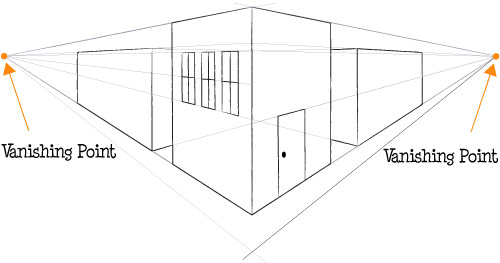
Here is a review of the process:
- In Procreate, under "Actions" open the drawing guide.
- Choose "perspective" drawing guide.
- Place two vanishing points.
- Open layers.
- Turn on drawing assist for the main lines of your drawing.
- Turn on quick shape in order to make curved lines.
- Turn off drawing assist to free draw.
The Drawing
You will be drawing a building based on the photo attached (called "2pointbuilding) It doesn't have to perfectly match, but it should be close. You don't want to include the street signs and trees. You will need to include the rounded arches on the tops of the windows.
You won't include the people, but you will need to include the character and sidekick from the previous lesson. You can have them standing on the corner or you could have them performing an interesting action.