
1.1 Tablet computer assignment
For this assignment, you will be taking a photo with an iPad, then marking it up using an Apple pencil. In order to do this, you will need to master a few iPad basics.
Step 1
On the iPad, open the camera app. During the daytime, go outside, where the lighting is good and take a photo which includes a horizon line. This could be the ocean, a road, a field, anything. What matters is that you take the photo yourself.
Step 2
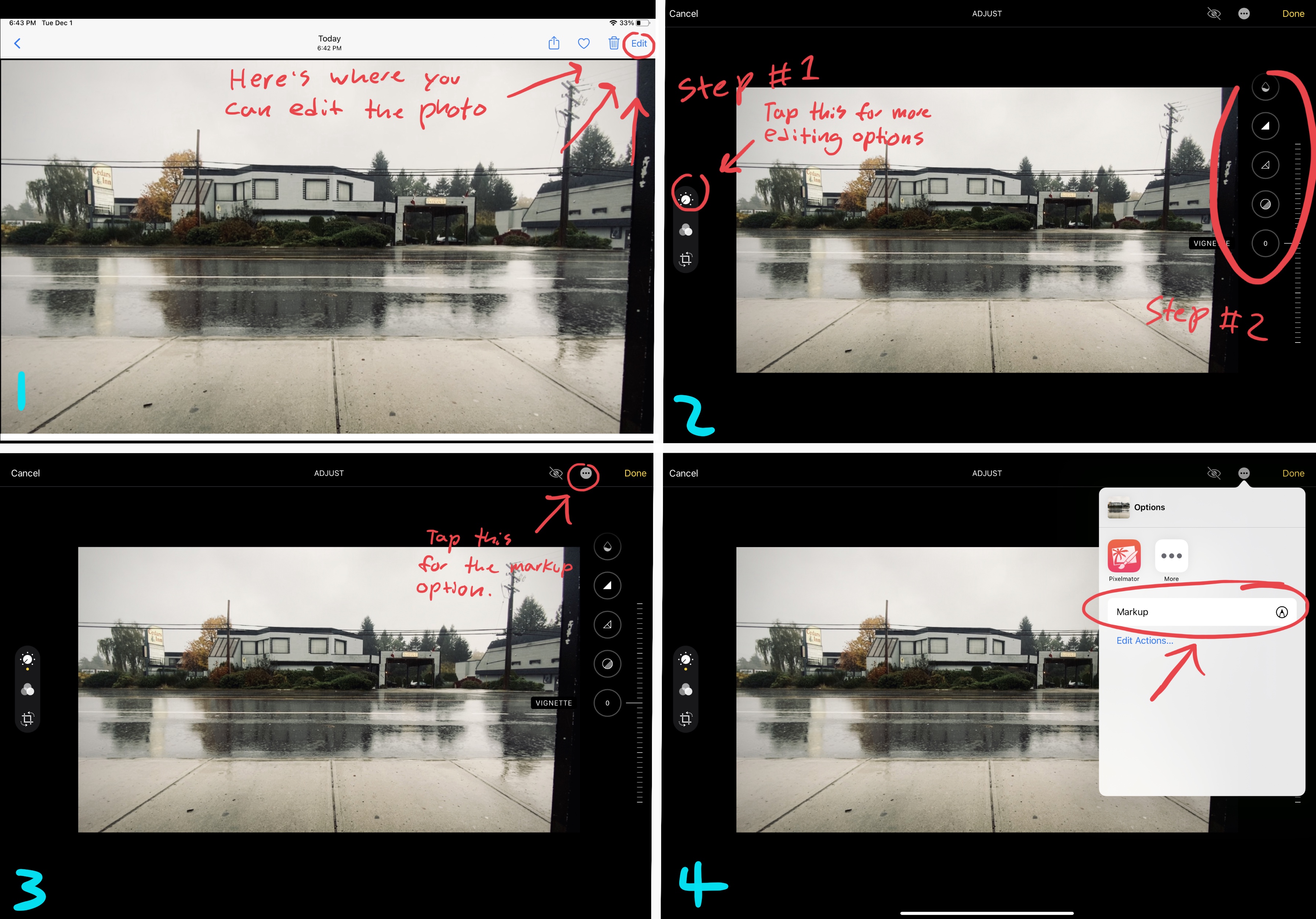
Open the photo in Photos. Tap the edit button. Tap the icon for cropping. Straighten and crop the photo. Tap the adjust icon. Increase contrast and saturation. Use the vignette effect. Save it.
Step 3
Use the Apple pencil to write your name and the date at the top of the photo. Now, change the colour then write a few sentences in which you explain how familiar you were with using either an iPad and pencil or any tablet and stylus before starting this course.
Step 4
Name your file with your firstname.lastinitial.jpeg then hand it in below.
There is an example of what your assignment might look like below.